Custom stats.json and Unlocking

youtube .. twitter .. musescore .. itch

back


Preface
Creating unlockables in IKEMEN is actually really easy if you use the existing stats.json file located in your save folder. That much is documented on the wiki and I won't go into that. What I want to cover is creating custom save data. The engine no longer lets you modify the stats table directly in lua, as that is handled in the go source code, so you would need to make a source edit and recompile the build. Instead, I'm going to cover making custom save data and referencing that when creating unlockables.


Part 1: Understanding stats.json
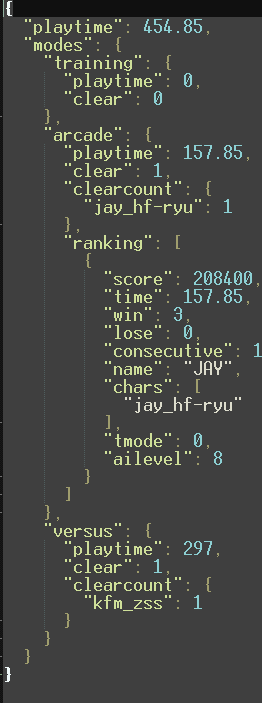
So what is stats.json anyways and why do we care? Well, in the context of unlockables, it is really important since it is save data. If you have limited IKEMEN playtime, this is what your stats.json might look like:

stats.json
You can see that it is formatted like a typical json table if you're familiar with them. How does this get read in lua code? Well, IKEMEN has native lua functions called jsonEncode and jsonDecode that do what they say. jsonEncode will encode a lua element to a json file, typically that element will be a table. jsonDecode will read a json table and turn it into a readable lua table. so, for example, a data table like:

{ "flag1": true, "flag2": true, "value": 25 }

will get formatted in lua like:

{ ["flag1"] = true, ["flag2"] = true, ["value"] = 25 }

You can create a lua table of your own and encode it to a .json file and have that act as your own stats.json or really any kind of save data you want to be loaded and read.