What Makes Fighting Games Feel "Smooth?"

youtube .. twitter .. itch


Preamble

The best fighting games you often hear feel "smooth" when you play them. Why is that? Much like any broad term to praise or critique a game, it has tons of depth and nuance that we can break into smaller pieces. This does cover a pretty wide range of topics and does get pretty abstract, but by the end of it you'll come out with a far deeper understanding and can develop your game with far more clarity in the realm of game feel.


Input Buffer

This is probably the world's most obvious answer one can give regarding this topic. Nobody likes it when they input a move, but the game gives either does not let them perform that move or they get a different move entirely. Input buffers are the main gateway to making your game feel smooth as butter or as jagged as a rock. It's important that we distinguish what "input buffers" are because there are multiple of them. There are button buffers, direction buffers and motion buffers. Button buffers are a more recent trend, as tons of older fighting games simply had no button buffers whatsoever. 1-frame links were real 1-frame links, no way around them. Reversals were also true 1-frames as well (provided pianoing is off the table a la Alpha 2).

This can be a real challenge to most players and some would even say its very unintuitive. While I feel that 1-frame button buffers are fine, I also see the other side of the road. It really can impose tons of difficult restrictions for those who want a better responsiveness with timing. It's easy to point and say "skill issue" but they do have a point. Most games nowadays go with a 3-5f button buffer, meaning that your button press can last much longer than just 1 single frame, granted it can last for that little amount of time if you tap fast enough in some games.

I explain all of that to say that if you are to develop something in the hopes of it playing responsively for most modern fighting game players, it is preferred you add some kind of button buffer to make things like combos or reversal timings more straightforward.

Next are direction buffers. These are a little different because they should 100% only last for as long as you hold them. If you add an additional, say, 2 frames of duration after you let go, you end up with a character that feels almost out of control. Hyperbolic, yes, but believe me at the end of the day the best feeling fighting games make you feel (mostly) in total control of your character. Basic movement should at least be readily available (or not available) as quickly as you allow it. There isn't much to it but things like jumping being something you can hold buffer as opposed to tapping is something to keep in mind.

Finally, the most important one of them all is motion buffers. These are what actually allow you to perform some of the crucial parts of one's kit. When constructing these input buffers, typically you treat each individual input as a "step" and you have a certain amount of time between each "step" to get to the next input. For example in a Hadoken motion (D,DF,F,P) you press the initial Down (D), then you have for example 10 frames to go from Down to Down-Forward (DF), another 10 to reach Forward (F), and finally another 10 for the punch at the end.


Visuals

Hit stop is just one piece of the puzzle, but you can't have a good car just by having a solid under the hood foundation. What the player's character is actually doing needs to look pretty too. This comes in many shapes and forms so this will be the longest section.

Take Eternal Fighter Zero for example. The hit stop in this game for normals is universal at 10f, which feels like a pretty small amount, but it still has good feedback because it delivers greatly in the visuals and audio department, which we will get to in a bit.
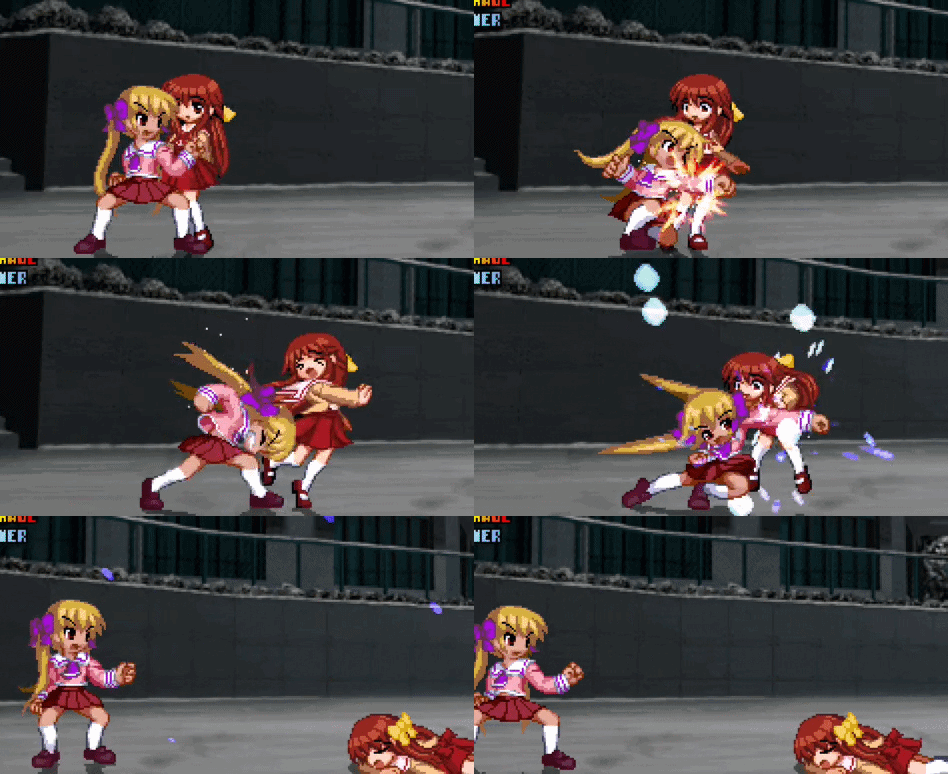


The first thing you may notice are the hit sparks. You can see they get increasingly bigger when the strength of the attack increases from 2A to 5B to 5C. The heavy sparks even change their color from orange to blue and their particles linger and literally bounce on the floor. Additionally, the animations of the characters themselves feel very smooth and snappy. All of Doppel's normals flow into each other very smoothly. Attack animations are a bit too complex of a topic to cover here in full, but having good keyframes is really important to giving your buttons the impact they need.

Just through understanding of keyframes and where to place the in betweens, attack animations can look buttery smooth and punch-y regardless of what other fluff you put on top of it. The 90s era of fighting games excelled at this unlike any other. A good example here is Street Fighter Alpha 2. Attacks in that game (and the Alpha series in general) nowadays can be seen as choppy, given that often times they don't use many animation frames and sometimes just use keyframes only, yet you would be lying if you said hitting even the most basic combos was not incredibly satisfying.
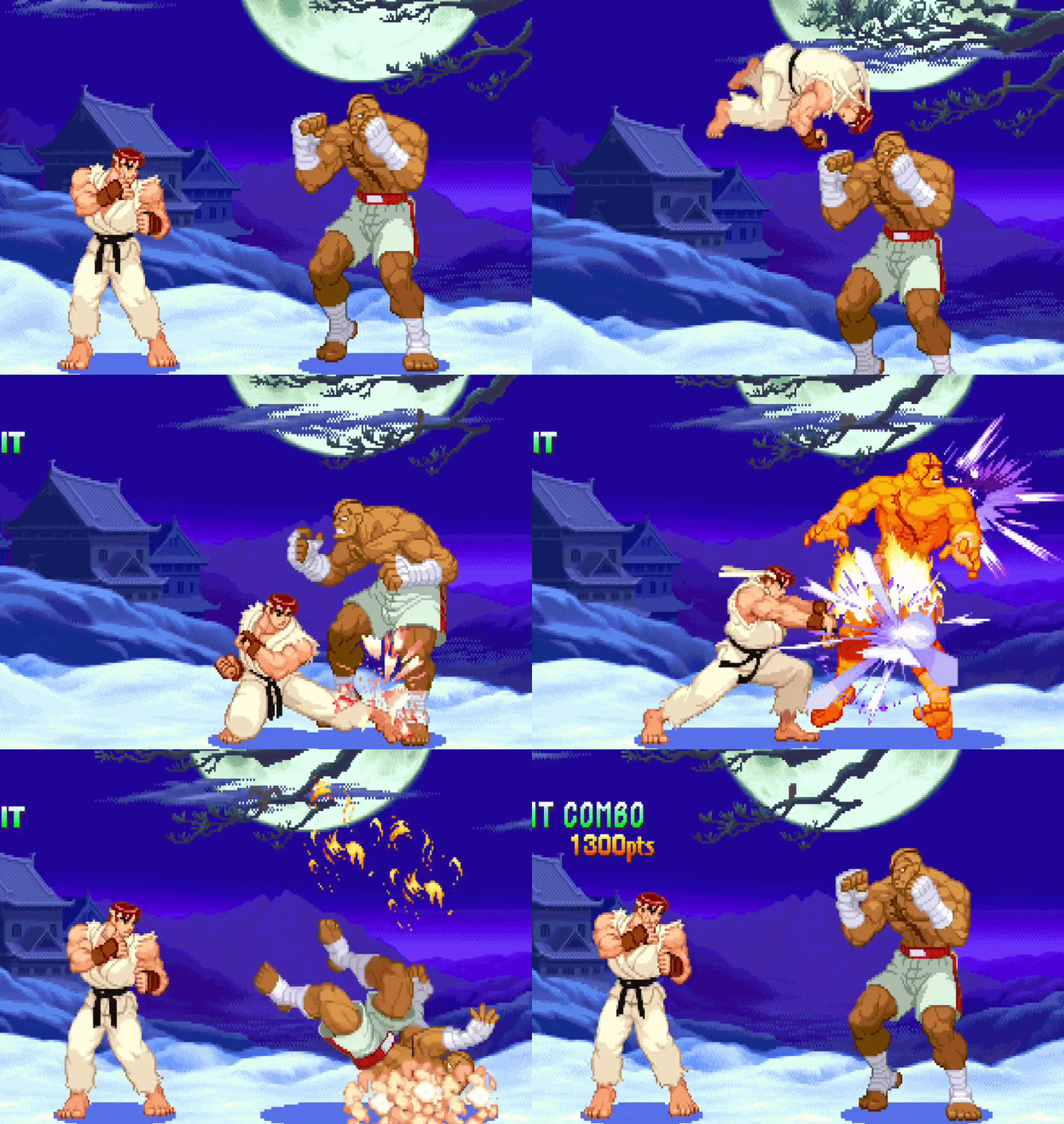


This is a basic short short fireball combo, yet it feels great to land as the hit stop on each attack is perfectly tailored, each attack has great clarity and flow (the low short itself just has 2 unique frames and they are spaced right in terms of where the legs starts and ends), and the fireball at the end has the impact that a combo ender needs to really invoke that dopamine rush of finishing a cool combo. The fireball in particular is what ties this together as it not only has good hit stop, knocks down, and causes the opponent to be burned, but it also slows down the game for a brief period, adding onto the impact the move has. It's a very nice cherry on top. Would I do this for every single combo ender I design? Definitely not, but you can see how it is useful here in a game where meterless combos are not at all flashy.

As for the actual art of animating fighting game attacks, I already said it was too complex to cover in full here, but I do want to share some basic tips to make those attacks flow a lot better. There is this book my cousin (who was an animator) gave me years ago called Animation by Preston Blair, and it actually really helped me when I was animating Battle Dudes characters. The specific concept that helped me and the one I'm going to show here is called the Line of Action.
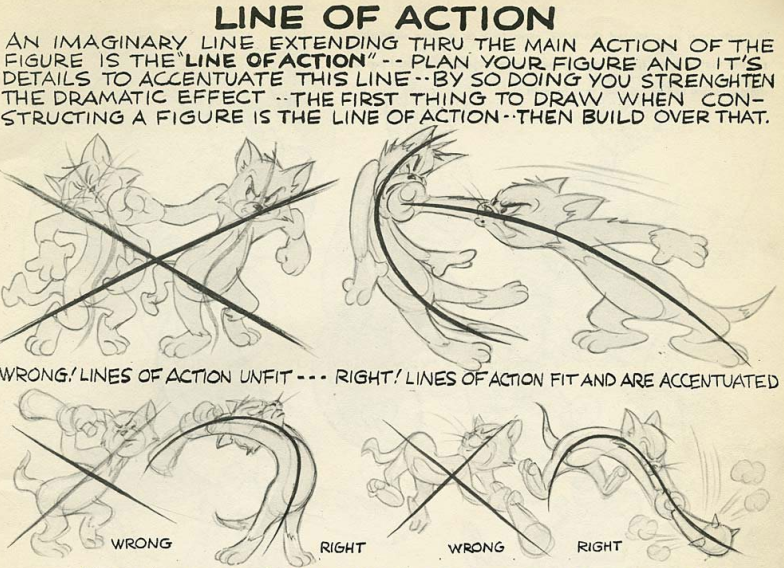


Though the book is primarily intended to be used to help draw and animate golden era MGM-style cartoons, a medium that generally lacks overlap with fighting games, you can still adapt and apply this concept to fighting game animations created by the greats, and ones created by the wannabe greats (like me!)
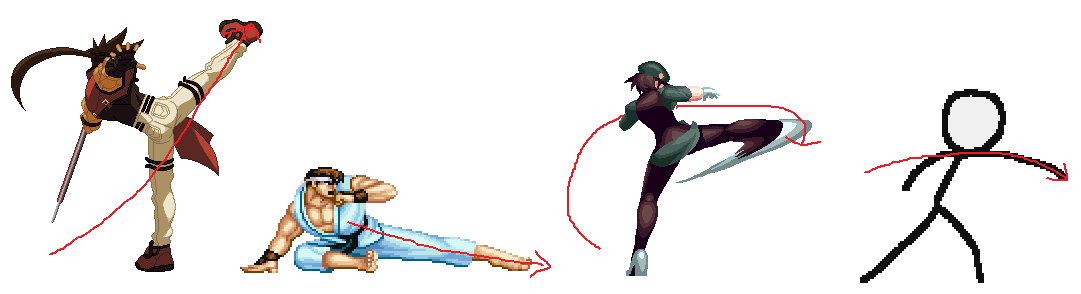


Here, I'm interpreting the Line of Action a little differently. Instead of drawing that line across the entire character as a whole, I'm drawing a line from where the attacking limb starts then what path it takes. Tons of talented animators do this when they are conceptualizing an attack animation, using various lines of action to ensure the attack animates smoothly. When an attack flows using these lines of action, the overall feedback of the buttons you press by extension feel better as well. As they say, "look good feel good play good." This is of course a simplified example of the concept, but I think it should help you understand what I mean by "attack flow" if you are unfamiliar with it.

Another important thing to note that you are probably aware of already is the actual length of this line of action. A quick jab might have a very small line of action, but a big roundhouse kick would probably have a much longer and more elaborate line of action. The impact of the attack is then compensated accordingly based on that. You don't want a really big line of action to just end up being a simple jab. You want to reserve those for bigger, harder hitting attacks. This is not always the case, but it is a general rule of thumb I recommend to follow.

Another reason why older games have such reverence in terms of their kinetic feedback is their keyframing. There's very little in betweens when it comes to the attack's motion. I borrow heavily from Capcom vs. SNK 2 in terms of my animation keyframing/posing, because I feel like it's perfect for what I want. We can look at how some of these attacks are keyframed and get a better understanding.

Your animation speeds tend to follow more closely in line with real physics. A wind-up into a punch is gonna start slow, then go really fast, then reach a stopping point, then slowly return back. In a lot of 2D games the wind-up it condensed into 1 or 2 sprites depending on the general speed of the buttons.
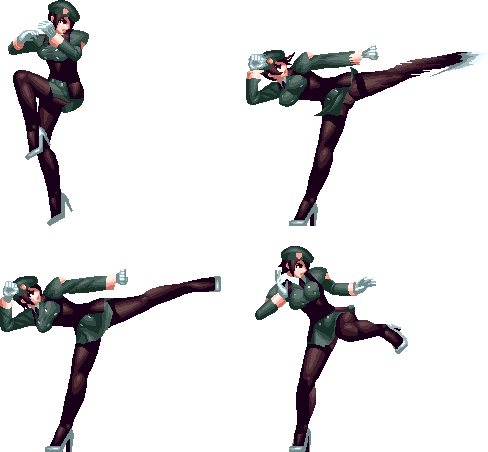


Kanae 5B for example has 4 unique frames. It is keyframed with 3, the extra frame is what I call the "snapback" frame, AKA the frame after the initial attack where the limb snaps back after extension. What is important to note about this animation and others like it is the "perceived motion." That first windup sprite lasts for about 6 frames, then immediately goes into the extended leg sprite. Your brain then fills in the gaps, and it makes the animation feel like it has a great deal of speed because of the space in between the leg winding up and actually extending being reached in a mere frame. Do keep in mind that this technique also takes into account that line of action mentioned earlier. There is a clean line that you can draw on the leg from the windup to the extension. If the leg were to start from, say, above rather than below, then the animation's perceived motion would be wonky because basic physics tell you that is not how one executes a thrust kick without some extra in between sprite to fill in the gaps for you to make it make sense. I like to study a lot of various resources to understand this attack logic from real life, since you're probably basing these attacks off of martial artists. Training videos from MMA fighters (Wonderboy Thompson in particular), martial arts movies, fencing/sword related media etc. are my go-tos.
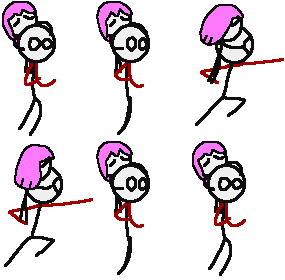


Another example this time from my own work. K2's j.HP has 3 unique startup sprites, which seems like a lot for a right straight punch, but this is to account for the move itself being a heavy and needing extra startup. Notice though that I never use any of these startup frames to fill the gap between the wind up and the punch. Why? I don't need to. The human brain does this for me. Those 3 startup frames are spent actually getting to the wind up, rather than filling between the wind up and the punch, because I want that punch to have considerable impact, and adding an extra frame between the wind up and punch makes the brain think that punch is coming in slower than it should, slightly reducing the potential impact. This also saves you a lot of time when animating. Because you know that your attack will actually have more impact if you keyframe everything properly based on line of action, you can save a frame or two by cutting out the middle man from the wind up and the strike.

Games like Street Fighter Alpha are all about this concept. I will show you two variants I made of Blanka's cr.HP from SFA3.



Notice the difference? There's 1 extra unique frame of startup on the left. That I borrowed over from the recovery on the attack. The one on the right is what Capcom uses. That does not have that in between frame. While both look fine at a glance, I would choose the timing on the right because as mentioned earlier, the perceived motion makes you believe the attack on the right is hitting harder than the one on the left. Each has their time and place of course, but in general this is the strategy I employ.

If you still are unsure about the space being perceived is too big for comfort, you can just add smear frames. Granted, you will need to be careful with those as not every attack needs a smear frame. Just attacks that have a large space between the frame before the attack and the frame of the attack. Particularly useful for sword attacks as they give more of a "cutting" feel. I will cover animation techniques in a different document.

Audio

What often goes overlooked a lot when discussing hit feedback is the sound design aspect. A hit's impact can certainly be felt without any sounds, but if you really want to go that extra mile, putting care into what your hits actually sound like is really important.

I showed many examples of what games did things right, but now I'm gonna show you an example of a game doing something "wrong" in the eyes of many people. I'm sure you're aware that SNK vs. Capcom: SVC Chaos definitely does not show up well in the sound department. Well, it's more like KOF 2003 didn't show up but that's besides the point.

The hits in those games just felt very weightless. They were too quick, and there was no real "impact" to them as it just felt like impact-adjacent noise. Having the generic stock "punch" sound did not help matters either. And this is from a franchise that I said had fantastic sound design in the hit stop section, I honestly believe the attack sounds in those older KOF games hard carry the impact/feedback they create alongside the hit stop. Without that, the hits just don't feel the same despite having the other bells and whistles (although SVC definitely didn't deliver in the hit stop department either in some aspects).

Good hit sounds have three components that I recommend to keep note of: Volume, impact, and linger. Volume is obvious, a hit sound should in theory be loud enough to be heard pretty clearly. Impact is kind of hard to describe, but the sound needs some kind of "pop" or "punch" at the beginning of it. After all, you are using your body to strike something, it is only natural the sound created from that is something that has impact. The grandiosity of the impact can depend on the strength of the hit sound, but typically it does not last too long. What does last long however is the linger. This is what separates realistic impact from the more fantastical arcade-y sounds that you hear in all the classics. A good hit sound will have some kind of lingering sound after the impact, kind of like a "shhhhh" sound. Heavier/stronger hit sounds tend to have a deeper, longer linger. When you mix all of that together, you should come up with a good set of hit sounds. That's just in general, of course you can apply some fancier effects for more specific kinds of hit sounds.


The Opponent Matters Too

We talked a lot about what happens on the player side, but we never really discussed arguably the most crucial part of this feedback. It takes two to tango, after all. Let's talk about hurt animations.

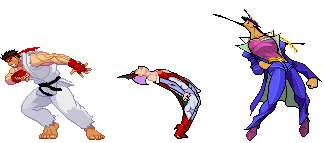
Hurt animations are pretty standard in appearance. After all you just smacked your opponent with a move, there's only so many variable ways you can animate someone getting smacked. But the importance here is making that hurt animation feel like they just got hit by something major. The gold standard for me are CPS3-era Capcom titles like Street Fighter III, Vampire Savior and Heritage for the Future. There are of course plenty of other titles to discuss on that topic and art styles might favor one animation style of the other, but I will highlight these as I find them particularly relevant to talk about.


You can see there's a huge "snapped back" element to these hits. Jotaro looks like he just got decked with an entire construction beam upside the head. What these animations give is a proper consequence to the attack. The hit stop, hit sounds, VFX and all that are one thing, but what really makes that hit feel as good as it does is what it actually did to the opponent. If their hurt animation isn't conveying the same message as the attack, then there is a huge discrepancy and something feels like it got lost in translation.

This is also why there's usually 3 kinds of grounded hurt animation types: standing high, standing low, and crouching. HFTF bumps that up a notch and has four, with a high, mid and low standing hurt set of animations and a crouching hurt animation, and 3D games tend to have even more than that. What this variety does is it allows you to create different kinds of reactions depending on the location of the attack. Is it a stiff kick to the midsection? It should probably have a low hurt animation. Is the animation a huge uppercut? That would preferably have a high hurt animation. That way the attack "makes sense" logically and it just looks better.

Additionally, the severity of the hurt animation needs to be properly gauged based on the strength of the attack. The hurt sprites shown here are mainly for the hardest hitting attacks one can receive and still be left standing. That way, you have reactions that fit the occasion. A character shouldn't reel all the way back from a jab to the face, but if they got hit by a huge kick to the face, then they might. On the 2D side of things, you might reserve at minimum 4 sprites for each hurt type, with each sprite increasing how much the character reels back.

What makes some attacks feel like they don't do anything is because the opponent just isn't reacting the way you would expect them to after certain attacks. Maybe they don't reel as much as you'd expect, or the logic of the move and the reaction the opponent has does not match up. Poor hurt animation quality can severely dampen what would otherwise be a visually powerful blow, so that is another thing to keep in mind when creating good attack feedback. It also really helps when helping decipher what is a hit and what is a blocked attack, but that is a topic for another day.


TL:DR

Making good attack feedback comes down to a good combination of hit stop, visual impact, animation logic, animation speed, hit sounds, and the reaction from the opponent. Sounds like a lot, I know. But this genre is so deep and complex, it's only natural that making a game in this genre has tons of nuances to keep track of too. Hopefully this allows you to appreciate how much care actually goes into these games in terms of player feel. There's so much more though, and I will cover all that soon!